

Launching a YouTube livestream is easy. Convincing people to join an empty broadcast is considerably harder.
A visible audience can make a live event appear established and active when new visitors arrive. For this reason, some creators use paid YouTube live viewer services to support the displayed concurrent viewer count during selected parts of a broadcast.
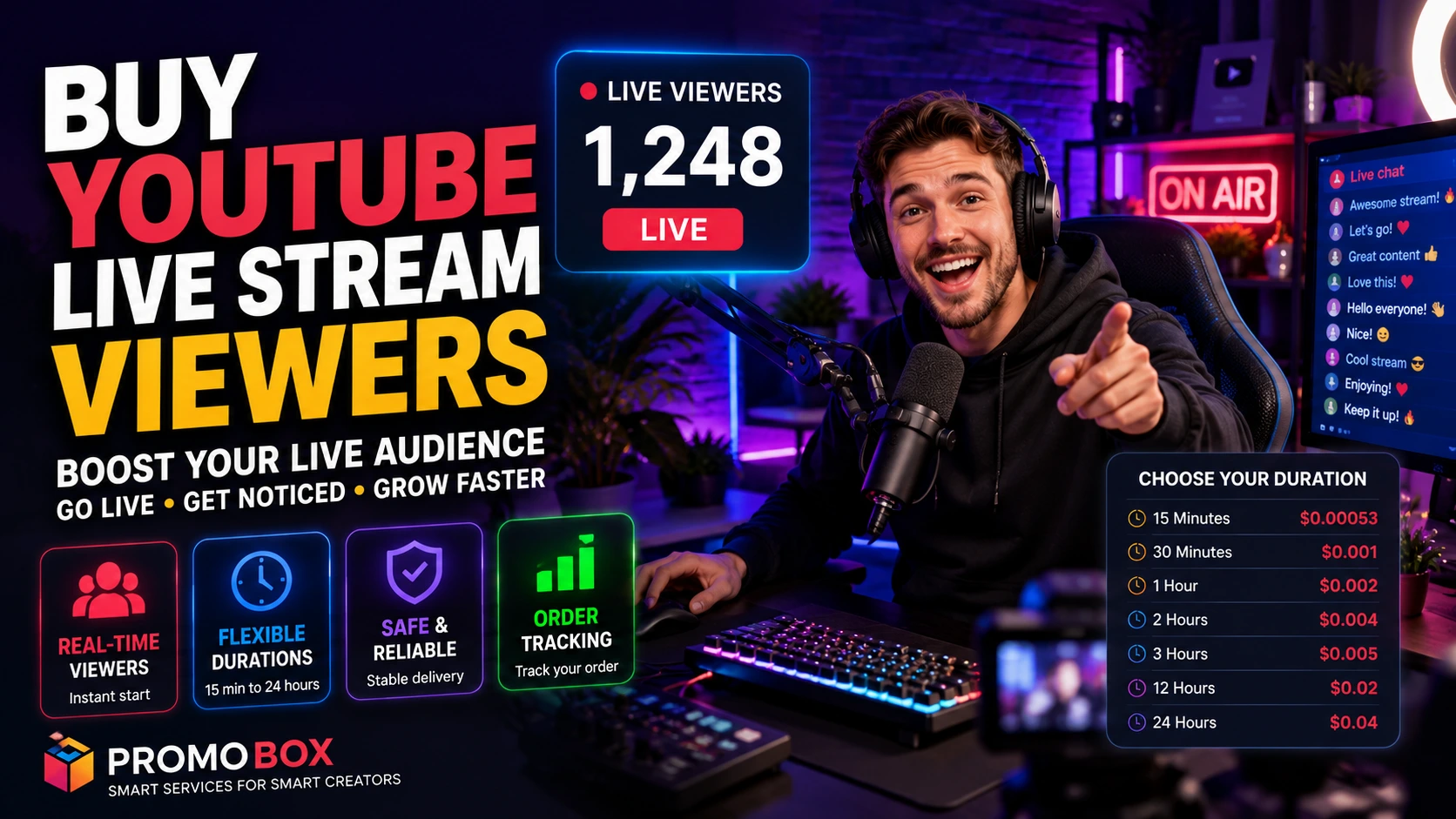
Promobox allows customers to order YouTube live stream viewers for periods ranging from 15 minutes to 24 hours. The service can be configured according to the expected length of a broadcast, whether it is a short product announcement, a gaming session, a webinar or a continuous webcam stream.
However, paid traffic must be approached carefully. YouTube states that artificial traffic may be excluded from channel metrics and can result in enforcement action. Creators should therefore verify that any third-party promotion method generates legitimate traffic and complies with YouTube’s policies before placing an order.
What Are YouTube Live Stream Viewers?
YouTube live stream viewers are people currently watching a broadcast at the same time.
YouTube calls this metric concurrent viewers. It is different from the total number of views accumulated during the stream. YouTube Studio also reports the peak concurrent audience, stream duration, likes and live chat activity.
For example, a broadcast may receive 2,000 total views during three hours while never exceeding 180 concurrent viewers at any single moment.
A live viewer service is designed to support the number displayed while the broadcast is active. Depending on the selected package, the ordered viewers remain connected for a defined period.
This is different from purchasing:
- regular video views;
- YouTube subscribers;
- likes;
- comments;
- live chat messages;
- views for the archived recording.
Each metric represents a separate type of activity. Ordering live viewers does not automatically include subscriptions, likes or chat participation unless these are explicitly listed as separate services.
Why Do Creators Buy YouTube Live Viewers?
Creators may consider purchasing live viewers when they want to strengthen the visible audience around a specific broadcast. The service is most commonly used during the opening stage of a stream, a scheduled event or a long-running live channel.
Avoiding an Empty Start
The first minutes of a livestream can be difficult. Notifications are still reaching subscribers, external posts are only beginning to generate clicks, and many viewers have not yet opened YouTube.
A creator may therefore use a short-duration package to support the displayed audience while organic viewers arrive from notifications, social media, search results and direct links.
This does not guarantee that people will remain on the stream. The title, thumbnail, topic, presentation and actual content must still give visitors a reason to watch.
Supporting Visible Social Proof
People frequently use visible engagement signals when deciding whether to investigate online content. A livestream with an existing audience can appear more active than one displaying only a few viewers.
This effect should not be overstated. A larger number alone does not prove that the broadcast is useful, entertaining or trustworthy. It also does not guarantee higher placement in YouTube recommendations.
The audience count is one visible signal among many. Watch time, viewer retention, relevance and genuine interaction remain important indicators of how the content performs.
Supporting Scheduled Events
Live viewers can be ordered around broadcasts such as:
- product demonstrations;
- webinars;
- interviews;
- gaming streams;
- podcasts;
- music performances;
- online conferences;
- live shopping events;
- sports discussions;
- public announcements.
For a scheduled event, the package duration should correspond to the period during which additional audience support is actually needed.
Maintaining Numbers During Long Broadcasts
Some channels operate for many hours without interruption. Examples include city webcams, travel streams, ambient music channels, wildlife cameras, weather broadcasts and event coverage.
For these channels, packages lasting 12 or 24 hours may be more practical than repeatedly ordering short sessions.
The service duration should still match the stream schedule. Paying for 24 hours of delivery would make little sense if the broadcast is expected to end after three hours.
How the Promobox YouTube Live Viewer Service Works
The ordering process is based on the stream URL, the desired number of viewers and the period for which they should remain connected.
Step 1: Prepare the YouTube Livestream
Create or schedule the livestream in YouTube Studio.
For encoder-based broadcasts, YouTube allows creators to open Live Control Room, select the Manage tab and schedule a new stream. Existing settings can also be reused for recurring broadcasts.
Before placing an order, verify that:
- the stream is publicly accessible;
- the scheduled start time is correct;
- the video title and thumbnail are complete;
- there are no channel-level live streaming restrictions;
- the encoder or streaming application is working properly.
YouTube requires an eligible and verified channel to use live streaming, and current restrictions can prevent a stream from starting.
Step 2: Copy the Direct Stream URL
Copy the public URL of the exact YouTube livestream you want to promote.
Do not submit:
- the general channel URL;
- a YouTube Studio management link;
- an unrelated video;
- a private or inaccessible broadcast.
The order must be associated with the correct live page.
Step 3: Select the Required Duration
Promobox offers separate packages according to how long the viewers should remain on the livestream.
The available options shown in the order form include:
- 15 minutes;
- 30 minutes;
- 1 hour;
- 2 hours;
- 3 hours;
- 12 hours;
- 24 hours.
The duration describes the intended delivery period for each ordered viewer. It does not describe how long the overall stream must remain live, although the broadcast should continue throughout the purchased period.
Step 4: Choose the Number of Viewers
Select the quantity required for the broadcast.
The appropriate number depends on factors such as:
- the normal audience size of the channel;
- the number of subscribers;
- previous concurrent viewer levels;
- the scale of the event;
- expected external traffic;
- the duration of the stream;
- the promotional budget.
A modest increase is generally easier to integrate into an existing audience pattern than an unexplained jump from a few viewers to several thousand.
Step 5: Submit and Track the Order
After entering the stream URL and quantity, review the order details and complete the purchase.
Promobox customers can monitor the order from their dashboard. Tracking is particularly useful for scheduled streams because the creator can verify whether delivery has started and whether the selected service is still active.
YouTube Live Viewer Packages and Pricing
The Promobox order form displays prices per viewer. Based on the current service options shown, the packages are structured as follows:
| Viewer duration | Price per viewer |
|---|---|
| 15 minutes | $0.00053 |
| 30 minutes | $0.001 |
| 1 hour | $0.002 |
| 2 hours | $0.004 |
| 3 hours | $0.005 |
| 12 hours | $0.02 |
| 24 hours | $0.04 |
The final order cost depends on both the selected duration and the number of viewers.
For example, the price of a three-hour campaign will be higher than the price of a 15-minute campaign because the viewers are expected to remain connected for a substantially longer period.
Prices can change. The amount displayed in the Promobox order form at checkout should be treated as the current price.
Which YouTube Live Viewer Package Should You Choose?
The best package is not necessarily the longest one. It is the package that corresponds to the format and duration of the broadcast.
15- or 30-Minute Viewers
Short packages may be suitable for:
- stream launches;
- brief announcements;
- premieres;
- product reveals;
- short Q&A sessions;
- the opening phase of a longer event.
These packages can be used when the primary objective is to support the initial audience while notifications and external promotion begin producing traffic.
One- to Three-Hour Viewers
Medium-duration packages are better aligned with:
- gaming sessions;
- interviews;
- webinars;
- live podcasts;
- panel discussions;
- music sets;
- workshops;
- community broadcasts.
Choose the package based on the expected running time rather than the maximum possible duration.
A 90-minute webinar, for example, may require a two-hour package rather than a three-hour package.
12- or 24-Hour Viewers
Long-duration packages are designed for extended streams such as:
- 24/7 webcams;
- ambient music broadcasts;
- city and nature cameras;
- all-day conferences;
- election or event coverage;
- long gaming marathons;
- continuous information channels.
These packages may also be useful when a channel has viewers arriving from several time zones and needs support across a broader part of the day.
How Many Live Viewers Should You Buy?
There is no single correct number for every channel.
The quantity should be assessed in relation to the channel’s existing performance. YouTube Studio provides concurrent and peak concurrent viewer reports, allowing creators to compare previous broadcasts and establish a realistic baseline.
A small channel that normally attracts 10 to 20 simultaneous viewers has a different audience profile from a channel that regularly reaches 500.
Before selecting a quantity, review:
- Average concurrent viewers from recent streams.
- Peak concurrent viewers.
- Traffic expected from subscribers and notifications.
- Traffic generated by external promotions.
- The importance and scale of the event.
- How quickly organic viewers normally arrive.
Avoid treating the largest available quantity as the default choice. Sudden, disproportionate audience changes may look inconsistent with the channel’s normal activity and do not ensure genuine engagement.
How to Prepare Your Stream Before Ordering Viewers
A live viewer order cannot repair a technically unstable or poorly prepared broadcast. Complete the following steps first.
Create the Stream in Advance
Scheduling provides time to distribute the URL and check all stream settings.
YouTube recommends sharing the streaming link at least 48 hours before going live. It also suggests displaying upcoming events on the channel, publishing a teaser, promoting the event through social accounts and embedding the URL on relevant websites.
Test the Technical Setup
Check:
- video resolution;
- audio quality;
- connection stability;
- encoder settings;
- latency;
- lighting;
- camera framing;
- backup equipment.
YouTube notes that selecting suitable stream settings helps creators reach the intended audience while maintaining appropriate stream quality.
Optimize the Title and Thumbnail
The title should clearly communicate:
- what the stream covers;
- who it is for;
- what viewers will gain;
- whether the event is currently live.
The thumbnail should be understandable at a small size and visually distinct from competing content.
YouTube now offers title and thumbnail testing for eligible content, and its testing system selects results based on watch time rather than clicks alone.
Prepare the Description
Include:
- a concise explanation of the stream;
- relevant links;
- the event schedule;
- speaker or guest information;
- product or resource links;
- appropriate keywords;
- disclosure information where required.
Avoid keyword stuffing or repeating the same phrase unnaturally.
Start the Broadcast Before Delivery
Where the selected service requires an active stream, launch the broadcast before the scheduled delivery time.
Starting several minutes early gives the creator an opportunity to identify audio, video or connection problems before the main event begins.
Prepare Chat Moderation
An active livestream can attract spam, irrelevant messages and inappropriate content.
Assign moderators where possible and configure YouTube’s live chat tools before the event. YouTube supports features including Q&A and other forms of real-time audience participation.
How to Attract Real Viewers Alongside Paid Live Viewers
A visible concurrent audience should not be the entire promotional strategy.
Sustainable livestream growth depends on attracting people who are interested in the subject and willing to watch, interact and return.
Use YouTube Notifications and Community Posts
Announce the event through the channel before it starts. A Community post can remind existing subscribers about the topic, date and start time.
Publish Shorts and Teasers
Create short clips explaining what will happen during the stream. Use a clear call to action directing viewers to the scheduled live page.
YouTube has continued developing links between Shorts, live content and longer videos, giving creators additional ways to move viewers between formats.
Share the Stream Externally
Depending on the audience, distribute the live URL through:
- Telegram;
- Discord;
- X;
- Facebook;
- Reddit;
- LinkedIn;
- relevant forums;
- an email newsletter;
- the creator’s website.
Promotion should be targeted. Posting the link repeatedly in unrelated communities is unlikely to produce qualified viewers and may be treated as spam.
Collaborate With Other Creators
A guest can introduce the broadcast to an adjacent audience. Interviews, joint streams and expert panels also provide additional reasons for viewers to join live rather than watch the recording later.
YouTube supports scheduled guest streams through its Go Live Together functionality.
Give Viewers a Reason to Stay
The stream should deliver value immediately.
Useful retention techniques include:
- starting on time;
- explaining the agenda early;
- avoiding long silent introductions;
- displaying the next segment;
- answering live questions;
- using demonstrations;
- acknowledging viewers;
- maintaining clear audio;
- removing unnecessary downtime.
Purchased viewers cannot compensate for weak retention among real people.
Benefits of Ordering YouTube Live Viewers Through Promobox
Promobox provides a configurable service rather than a single fixed package.
Fast Start
The service is presented as a fast-start option for active broadcasts. This is useful when the creator needs delivery around a defined event rather than over several days.
Flexible Durations
Customers can select a period ranging from 15 minutes to 24 hours. This makes the service applicable to both short launches and continuous livestreams.
Scalable Quantities
The creator selects the required number of viewers instead of purchasing a package with an unsuitable fixed audience size.
Transparent Per-Viewer Pricing
Each duration displays its price per viewer in the order form. This makes it possible to estimate the final cost before checkout.
Order Tracking
Customers can follow the order status from the Promobox dashboard instead of relying only on the displayed number on YouTube.
Additional YouTube Promotion Services
Promobox also provides other YouTube-related services from the same account. Depending on the current catalogue, customers can review options for video views, subscribers, likes, comments and other forms of channel promotion.
Each service should be selected separately according to the objective of the campaign.
Important Limitations and Realistic Expectations
Buying live viewers is not a substitute for developing a genuine audience.
The service does not guarantee:
- organic recommendations;
- higher search rankings;
- increased watch time from real viewers;
- subscriptions;
- comments;
- sales;
- advertising revenue;
- monetization eligibility;
- long-term channel growth.
YouTube verifies engagement metrics and may adjust counts while determining whether interactions are legitimate. Its systems are intended to distinguish genuine human activity from automated or artificial engagement.
YouTube’s fake engagement policy also states that artificial page traffic may not be counted and can lead to strikes. Content, channels or service providers that artificially inflate views, likes, comments or other metrics may violate platform rules.
For that reason, creators should:
- review YouTube’s current policies;
- ask the provider how traffic is generated;
- avoid bots and automated traffic;
- avoid guaranteed algorithmic outcomes;
- monitor analytics for unusual traffic patterns;
- use third-party services at their own discretion;
- prioritize genuine audience acquisition.
Promobox should be treated as an additional promotional tool, not as evidence of organic popularity or a guaranteed route into YouTube recommendations.
Frequently Asked Questions
Yes. The service is intended for an active or scheduled YouTube livestream, depending on the selected package and current order requirements. Submit the direct URL of the relevant broadcast.
An order may be prepared before the event, but the stream generally needs to be publicly accessible when delivery begins. Verify the service instructions shown in the order form.
The Promobox service is marked as offering a fast start. Exact delivery speed can depend on the order quantity, service availability and status of the livestream.
The selected service determines the intended duration. Available options range from 15 minutes to 24 hours.
Yes. The 12-hour and 24-hour packages are the most relevant options for continuous streams such as webcams, music channels and other long-running broadcasts.
Delivery cannot continue normally after the target broadcast becomes unavailable. Keep the stream active for the complete ordered duration and check the provider’s refill, cancellation or refund conditions before purchase.
Yes. The order form displays a separate per-viewer price for each duration. The total is calculated from the selected service and quantity.
Promobox provides order tracking through the customer dashboard.
Not automatically. Viewers, likes, comments and chat activity are separate forms of engagement. Only the elements explicitly listed in the selected service should be expected.
Buy YouTube Live Stream Viewers With a Duration That Fits Your Broadcast
The most suitable YouTube live viewer package depends on how long the broadcast will run and when additional audience support is required.
Short packages can support launches and announcements. One- to three-hour options correspond to common gaming streams, interviews, webinars and podcasts. Twelve- and 24-hour packages are designed for continuous broadcasts and extended events.
With Promobox, customers can choose the number of viewers, select how long they should remain on the stream and monitor the order through the dashboard.
Use the service as part of a broader livestream strategy that includes a strong topic, reliable production, targeted promotion and genuine audience engagement. Before ordering, confirm that the traffic method complies with YouTube’s current fake engagement and spam policies.
About the author


Leave a Reply