

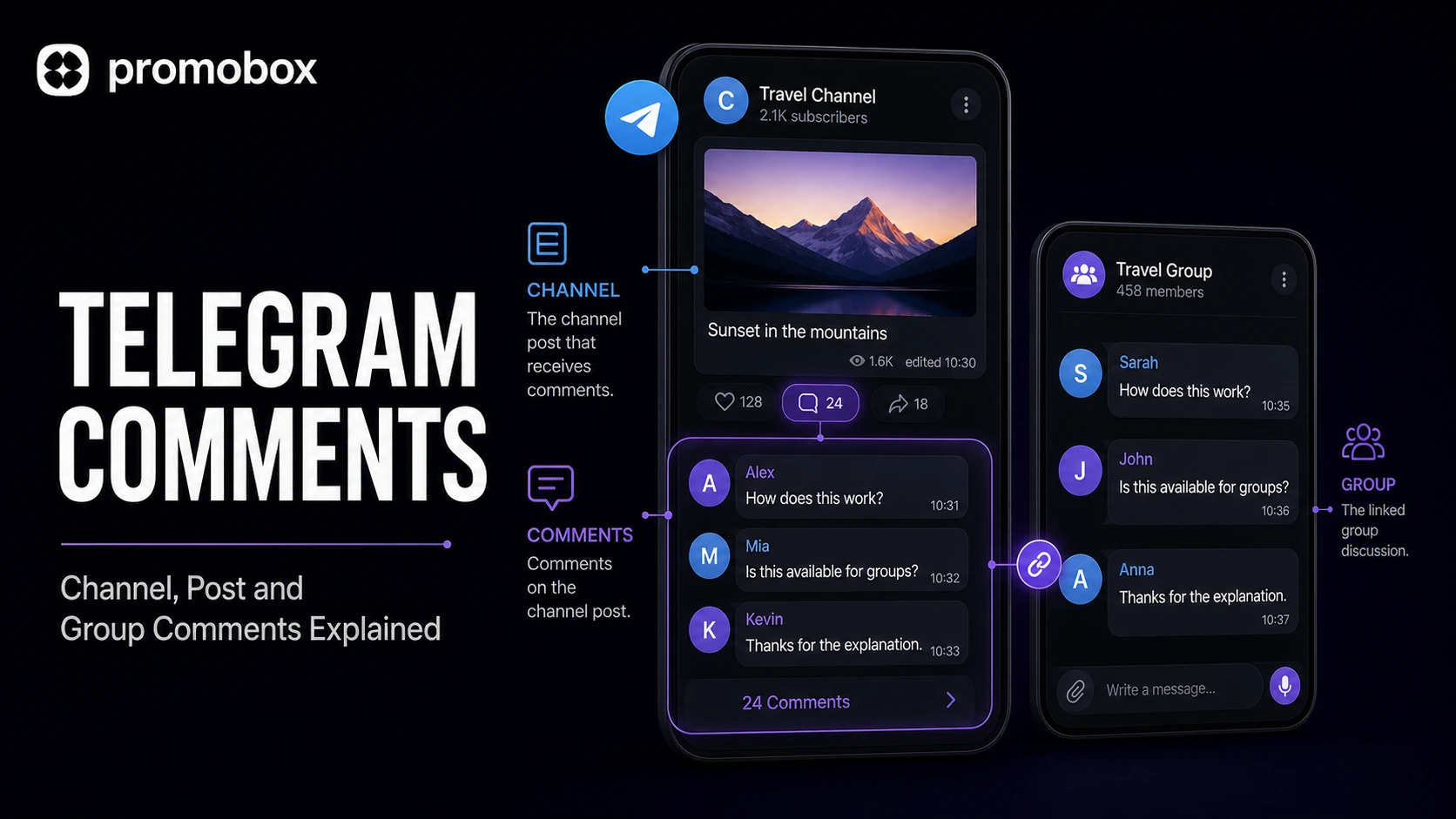
A Telegram channel does not have a separate comment feed by default. Comments become available when the channel owner links a discussion group to the channel. Each channel post can then open its own comment thread, while the same replies also appear in the connected group.
This setup creates several terms that are easy to confuse. “Channel comments” and “post comments” usually describe the same feature from different perspectives. Group comments, however, are normally regular messages and replies inside a Telegram group.
Understanding that distinction helps channel owners configure discussions correctly, moderate conversations and provide the right link when ordering custom Telegram comments.
What Are Telegram Comments?
A Telegram comment is a reply attached to a particular channel post. Readers open the thread by selecting the comment button below that post.
Telegram describes channels as broadcasting tools. A channel publishes posts to subscribers, while a group is built for conversations between members. To add a discussion area beneath channel posts, the channel owner must connect a group.
Once the discussion group is linked:
- channel posts can display a comment button;
- each post receives its own discussion thread;
- comments are also delivered to the linked group;
- replies remain connected to the original channel post;
- group administrators can moderate the discussion.
According to Telegram’s official Channels FAQ, comments appear in their own threads and also reach the discussion group. This allows readers to respond from the post while administrators manage the wider conversation through the linked group.
Channel Comments and Post Comments: Is There a Difference?
In most cases, channel comments and post comments refer to the same Telegram feature.
The difference is one of emphasis:
- Channel comments describes the commenting feature across a channel.
- Post comments refers to replies beneath one specific publication.
A channel may have commenting enabled, but every discussion still belongs to an individual post. Someone reading an announcement from Monday and someone commenting on a Friday update enter different threads, even though both discussions are connected to the same group.
This distinction matters when sharing or promoting a conversation. A general channel link points visitors to the channel, while a specific post link identifies the publication beneath which the comments should appear.
How Telegram Channel Comments Work
Telegram introduced comment buttons for channels with discussion groups in 2020. The official setup path is:
Channel Settings → Discussion
The channel owner selects an existing group or creates one to serve as the discussion group. After the connection is established, eligible channel posts can open threaded conversations.
The basic structure is:
- The channel publishes a post.
- Telegram sends the post to the connected discussion group.
- Readers select the comment button below the channel post.
- Their replies appear in the post’s thread.
- Those replies also appear in the discussion group.
This means a channel comment is not stored in an isolated channel-only area. The linked group provides the discussion layer behind the channel post.
If a user who is not a member of the discussion group receives a reply, Telegram can notify that user through the separate Replies chat. Telegram explains this behavior in its announcement of channel comments.
How to Enable Comments on a Telegram Channel
You need administrative access to the channel and a group that can be linked for discussion.
The process is:
- Open the Telegram channel.
- Go to the channel settings.
- Select Discussion.
- Choose an existing group or create a new one.
- Confirm the connection.
- Publish or check a channel post.
- Open the comment button to verify that the thread works.
Before enabling public participation, review the permissions and administrator roles in the connected group. Telegram groups support configurable member permissions, administrator privileges and moderation tools.
If no comment button appears, check whether:
- a discussion group is still connected;
- commenting is allowed in the group;
- the relevant post was published with the current discussion setup;
- the group or channel permissions restrict participation;
- the Telegram application needs to be updated.
What Are Group Comments on Telegram?
Telegram groups are conversational spaces. Members send messages directly into the shared chat and can reply to individual messages.
People sometimes call these replies “group comments,” but Telegram generally treats them as group messages and replies rather than channel post comments.
The difference can be summarized as follows:
| Feature | Channel post comments | Group messages and replies |
|---|---|---|
| Main purpose | Discuss a published channel post | Hold a conversation inside a group |
| Starting point | A specific channel post | Any message sent to the group |
| Requires a linked discussion group | Yes | No |
| Opens from a comment button | Yes | No |
| Appears in a group chat | Yes, in the linked discussion group | Yes, directly in the group |
| Connected to a channel publication | Yes | Not necessarily |
A standalone group does not need a channel. Members can post, reply, mention other participants and use topics when the relevant group settings allow it.
Telegram groups can also organize conversations into topics. Each topic has its own message history, shared media and notification settings. Topics are useful for separating recurring subjects, but they are not the same as comment threads beneath channel posts.
Channel Comments vs Direct Messages to a Channel
Comments should not be confused with direct messages to a channel.
A comment is public within the discussion structure connected to a channel post. A direct message creates a private conversation between a subscriber and the channel’s owners or administrators when that feature is enabled.
Telegram introduced channel direct messages as a separate option. Channel owners can manage these conversations without exposing their personal accounts. The official setup path is:
Channel Settings → Direct Messages
Use comments when readers should discuss a publication with one another. Use direct messages when a subscriber needs to contact the channel privately.
Comments in Telegram Group Calls
Telegram also uses the term “comments” for temporary messages shown during some group calls and video chats. These call comments briefly appear inside the call interface and are separate from:
- channel post comments;
- group chat messages;
- discussion topics;
- direct messages to a channel.
They should not be used interchangeably when planning or ordering engagement for a channel post. A custom comment service for Telegram channel posts targets the discussion associated with a publication, not the temporary comment interface inside a group call.
What Makes a Useful Telegram Comment?
A useful comment responds to the actual content of the post. It may ask a relevant question, mention a specific point, add context or express a concise opinion.
Compare these examples:
Generic:
“Great post!”
Specific:
“Does this update also apply to existing channel members?”
Generic:
“Interesting.”
Specific:
“The comparison in the second section makes the difference much clearer.”
Specific comments fit the publication more naturally because they refer to its subject. A short comment can still be relevant; it does not need to repeat the entire post.
When preparing custom comments, consider:
- the language used by the channel;
- the topic of the individual post;
- whether the tone is professional, technical or informal;
- whether a question can be answered from the post;
- how similar the submitted comments are to one another;
- whether each comment makes sense beneath that exact publication.
Avoid copying the same sentence repeatedly or submitting comments unrelated to the post.
Custom Telegram Channel Post Comments on PromoBox
PromoBox offers two services listed as Custom Comments for Telegram Channel Posts:
| Service | Price per comment |
|---|---|
| Custom Comments for Telegram Channel Posts | $0.01 per comment |
| Custom Comments for Telegram Channel Posts | $0.012 per comment |
These are two separate options shown in the service selector. The supplied interface does not specify a verified difference in delivery method, account source or other characteristics, so buyers should review the live service details before choosing between them.
The visible order range is 1 to 500 comments. At the displayed per-comment prices, the totals are:
| Quantity | At $0.01 each | At $0.012 each |
|---|---|---|
| 1 comment | $0.01 | $0.012 |
| 10 comments | $0.10 | $0.12 |
| 50 comments | $0.50 | $0.60 |
| 100 comments | $1.00 | $1.20 |
| 250 comments | $2.50 | $3.00 |
| 500 comments | $5.00 | $6.00 |
Prices and availability can change, so the active service selector should be treated as the current source before placing an order.
How the PromoBox Order Form Works
The order interface requests three main inputs:
- Service — select one of the available Custom Comments for Telegram Channel Posts options.
- Link — provide the link required by the selected service.
- List of comments — enter the custom comments one per line.
The quantity selector in the supplied interface supports values from 1 to 500. Prepare the same number of comment lines as the selected order quantity.
Before submitting an order:
- confirm that the link opens the intended channel post;
- make sure comments are enabled for that post;
- check that the discussion group is connected;
- use one comment per line;
- verify the spelling and language;
- remove duplicate or irrelevant entries;
- compare the selected quantity with the number of supplied comments.
The PromoBox services catalog provides the current platform service list. Because individual service URLs were not supplied, no unverified product-page slug is used here.
Which Link Should You Use?
A custom channel post comment order should identify the intended publication, not merely the channel homepage.
Before copying the link:
- Open the exact Telegram channel post.
- Use Telegram’s sharing or copy-link option.
- Paste the link into a browser or separate Telegram session.
- Confirm that it opens the correct post.
- Check that the comment button is available.
A public channel post normally has a shareable link. Access to content in a private channel depends on the channel and invitation settings, so verify that the selected service can work with the link before ordering.
Do not substitute:
- the general channel link;
- a link to an unrelated post;
- the discussion group homepage;
- a direct-message link;
- a screenshot of the publication.
The form requires a link that identifies the target supported by the selected service.
How Many Comments Should You Order?
The appropriate quantity depends on the post, the existing discussion and how many distinct comments you can prepare.
A smaller set may be sufficient when:
- the post covers a narrow update;
- only a few distinct questions are relevant;
- the channel normally receives limited discussion;
- you want to test the ordering workflow.
A larger set requires more unique lines and closer editorial review. Increasing the quantity without increasing comment variety can produce repetitive text.
The PromoBox selector shown for these services permits between 1 and 500 comments. The price calculation is linear: multiply the number of comments by either $0.01 or $0.012, depending on the selected option.
Moderating Comments After Publication
Because channel comments also appear in the connected discussion group, moderation should be configured there.
Administrators can:
- review messages in the discussion group;
- delete content when their permissions allow it;
- manage participant permissions;
- restrict users when necessary;
- use Telegram’s group moderation and anti-spam options.
Custom comments do not replace moderation. Review the resulting discussion just as you would review messages submitted directly by group members.
The linked group can also contain conversations that are not attached to a particular channel publication. Moderators should distinguish those general messages from the comment threads created for individual posts.
Choosing Between Channel, Post and Group Comments
Use the location of the conversation as the decision rule:
- Choose channel comments when discussing the comment feature across a Telegram channel.
- Choose post comments when referring to replies beneath one particular channel publication.
- Use group messages or replies for conversations that begin directly inside a Telegram group.
- Use topics when a group needs separate subject-based discussion areas.
- Use channel direct messages for private subscriber-to-admin communication.
- Treat group call comments as a separate temporary feature inside calls and video chats.
For a PromoBox Custom Comments for Telegram Channel Posts order, enable the channel’s linked discussion group, copy the exact post link and prepare one relevant comment per line before selecting the required quantity.
About the author





Leave a Reply