

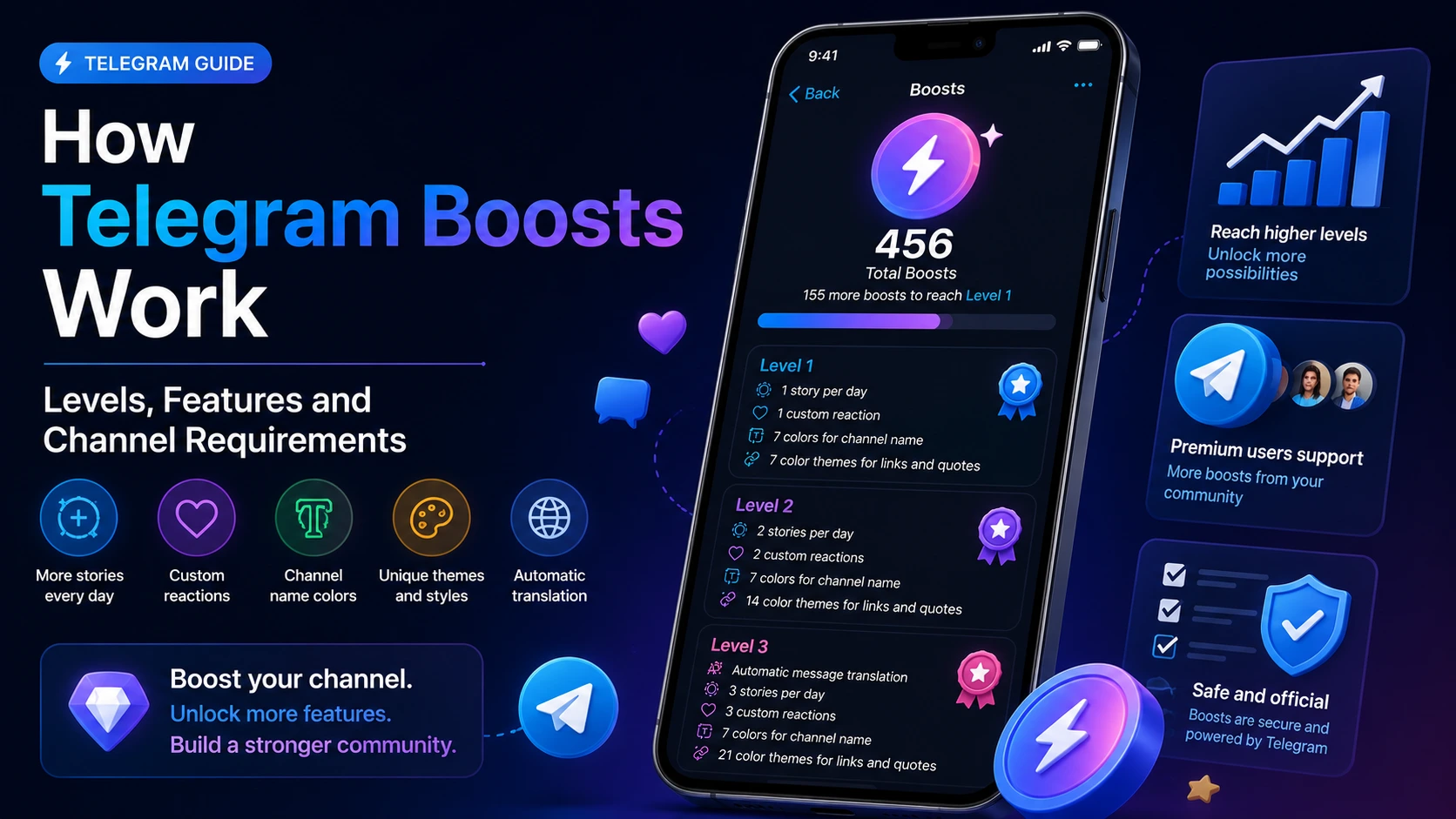
Telegram Boosts allow Premium users to support channels and supergroups by contributing toward their boost level. As a channel reaches higher levels, Telegram unlocks additional publishing and customization features, including more stories per day, custom reactions, channel colors, link styles, emoji status options and, at higher levels, automatic message translation.
The number of boosts required is not fixed across all channels. Telegram calculates the threshold individually based on the channel’s subscriber count and displays the current requirement directly in the channel’s Boosts section.
Quick answer: A Telegram Boost is a benefit allocated by a Telegram Premium user to a channel or supergroup. Boosts do not function as subscribers, views or reactions. Instead, they help the channel reach new levels and unlock additional Telegram features.
What Is a Telegram Boost?
A Telegram Boost is an allocation that a Premium user can assign to a channel or supergroup. Each boost contributes toward that community’s current level.
Once the required threshold is reached, Telegram raises the channel or group to the next level and makes additional features available. These features may include:
- more stories per day;
- additional custom reactions;
- channel name colors;
- color themes for links and quoted messages;
- emoji status and appearance options;
- automatic message translation at higher levels.
Telegram’s official documentation describes boosts as a mechanism through which Premium users grant channels and supergroups additional functionality, including the ability to publish stories.
A boost should therefore not be confused with a conventional engagement metric.
| Metric | What it represents |
|---|---|
| Subscriber | A user following a channel |
| View | A recorded view of a post or story |
| Reaction | A response attached to a specific post |
| Boost | A Premium allocation that contributes toward a channel or group level |
Boosts unlock platform features. They do not automatically generate subscribers, post views or reactions.
How Telegram Boost Levels Work
Telegram channels and supergroups progress through boost levels. Every level requires a certain number of active boosts.
The exact requirement is different for each channel or group because Telegram bases the threshold on its total number of subscribers or members. A channel with a larger audience may therefore need more boosts to reach the next level than a smaller channel.
The Boosts screen normally shows:
- the current number of boosts;
- the current channel level;
- the next available level;
- the number of additional boosts required;
- the features unlocked at each level;
- the button or link that users can use to boost the channel.
In the example below, the channel has 456 active boosts and still needs 155 additional boosts to reach Level 1.
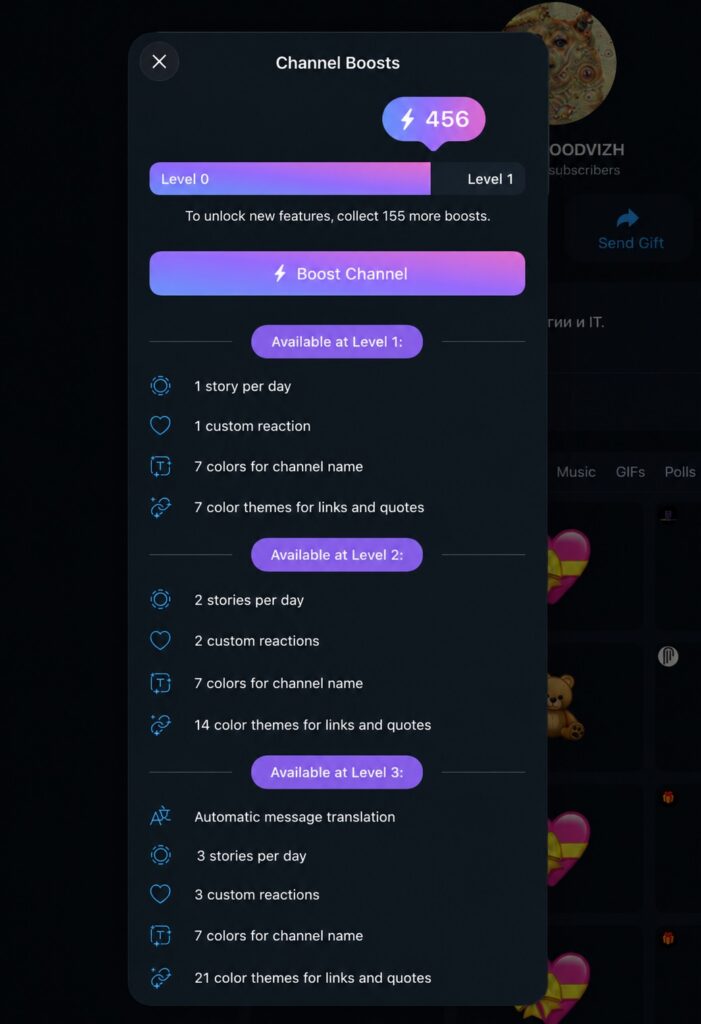
The important point is that there is no universal numerical rule such as “10 boosts always equal Level 1.” Channel owners must check the requirement shown inside their own Telegram interface.
How Many Boosts Does a Telegram Channel Need?
Every Telegram channel requires a different number of boosts. Telegram calculates the requirement according to the channel’s subscriber count and displays the result in the Boosts section.
To calculate how many additional boosts are still needed, use the numbers provided by Telegram:
Boosts still required = next-level requirement − current active boosts
For example:
| Current active boosts | Boosts required for next level | Still required |
|---|---|---|
| 456 | 611 | 155 |
This calculation only determines the remaining amount. It does not calculate Telegram’s underlying level threshold, which is assigned by the platform.
Because the requirement changes according to the channel, articles that publish one fixed number for every account may be inaccurate.
How to Check Your Telegram Channel Boost Level
Channel administrators can check the current level and boost requirement directly in Telegram.
Depending on the Telegram application and operating system, the navigation may appear as:
- Open the channel profile.
- Open the channel settings or additional options.
- Select Statistics.
- Open Boosts or Boost Channel.
- Review the current level and the number required for the next level.
Telegram also states that channel owners can find their unique boost link through the channel settings and statistics area. For groups, the corresponding option is available from the group profile or under Statistics → Boosts.
The exact labels may differ slightly between Telegram Desktop, Android, iOS and different interface languages.
What Does Each Telegram Boost Level Unlock?
The available features increase as the channel moves through the levels.
The precise list can evolve as Telegram introduces new functionality, but the current interface shows a clear progression.
Telegram Channel Level 1
At Level 1, the example interface displays:
- 1 story per day;
- 1 custom reaction;
- 7 colors for the channel name;
- 7 color themes for links and quoted messages.
This means that reaching the first level gives the channel its initial set of boost-based publishing and appearance options.
Telegram Channel Level 2
At Level 2, the example displays:
- 2 stories per day;
- 2 custom reactions;
- 7 colors for the channel name;
- 14 color themes for links and quoted messages.
The channel receives an additional daily story and one additional custom reaction. It also receives a wider selection of themes for links and quoted text.
Telegram Channel Level 3
At Level 3, the example displays:
- automatic message translation;
- 3 stories per day;
- 3 custom reactions;
- 7 colors for the channel name;
- 21 color themes for links and quoted messages.
Telegram has continued expanding channel functionality, including automatic translation capabilities for channels that meet the applicable boost requirements.
General Level Progression
Telegram’s Premium FAQ states that each new channel level adds:
- one additional story per day;
- one additional custom reaction;
- further customization options.
The platform also lists features such as emoji status, themes and custom wallpapers among the benefits unlocked through channel levels.
| Level | Stories per day | Custom reactions | Link and quote themes | Additional feature shown |
|---|---|---|---|---|
| 1 | 1 | 1 | 7 | Initial appearance options |
| 2 | 2 | 2 | 14 | Expanded theme selection |
| 3 | 3 | 3 | 21 | Automatic message translation |
This table reflects the Telegram interface captured for this article. Telegram may modify individual features or requirements in later application updates.
What Are Telegram Boosts Used For?
The main purpose of Telegram Boosts is to unlock additional functionality for a channel or supergroup.
Publishing More Channel Stories
Telegram originally introduced the boost system as a way for channels to gain access to stories. Channels receive the ability to publish additional stories as they progress through the boost levels.
This can be useful for:
- daily announcements;
- temporary promotions;
- event coverage;
- behind-the-scenes content;
- audience polls and questions;
- reminders that do not need to remain in the permanent post feed.
Adding Custom Reactions
Each channel level can add another custom reaction. This allows administrators to create a reaction set that better matches the subject, branding or audience of the channel.
Custom reactions can make interaction more relevant, but they do not automatically improve engagement. Subscribers still need to choose to react to the content.
Customizing Channel Appearance
Boost levels can unlock additional visual options, including:
- channel name colors;
- themes for links and quoted messages;
- emoji status;
- custom wallpapers;
- other appearance settings.
Telegram expanded these customization features after introducing channel stories, allowing channels to change their appearance as they gained levels.
Enabling Automatic Translation
At higher levels, Telegram may make automatic message translation available to the channel.
This is particularly relevant for:
- multilingual communities;
- international news channels;
- travel channels;
- gaming communities;
- crypto and technology projects;
- companies communicating with users in several countries.
Translation can improve accessibility, but it should not replace manually reviewed translations when legal, financial or technically sensitive wording is involved.
Who Can Give Telegram Boosts?
Telegram Premium users can assign their available boosts to eligible channels and supergroups.
According to Telegram, a Premium subscription currently includes four boosts that may be allocated to groups or channels. Users may assign multiple boost slots to the same community.
A user can typically boost a channel by:
- opening the channel’s unique boost link;
- selecting the boost option from the channel profile;
- assigning one or more available boost slots.
For public channels, Telegram documents boost links in formats such as:
https://t.me/boost/channelusername
or:
https://t.me/channelusername?boost
Private channels use a link containing the internal channel identifier rather than a public username.
How Can a Channel Get More Boosts?
Telegram identifies several official ways for channels to receive boosts.
1. Boosts From Premium Subscribers
Channel administrators can share the channel’s unique boost link with subscribers. Premium users can then allocate available boosts to that channel.
The request should explain why the channel needs boosts and which feature will be unlocked. A concrete request is generally clearer than simply asking users to “support the channel.”
For example:
Our channel needs 15 more boosts to reach the next level and enable an additional daily story. Premium subscribers can contribute through our official boost link.
2. Telegram Premium Giveaways
Channels may organize Telegram Premium giveaways. Telegram states that the channel receives boosts from the Premium subscriptions included in the giveaway.
Giveaways can combine several objectives:
- rewarding existing subscribers;
- attracting new participants;
- increasing the channel’s boost count;
- promoting a specific campaign.
Telegram also supports giveaways using Telegram Stars and other prizes, with the associated boosts helping unlock channel and group features.
3. Gifting Telegram Premium
Channel administrators can gift Premium subscriptions to friends or contacts and receive additional boosts that they may assign themselves.
Telegram’s current FAQ states that administrators receive three boosts for each Premium gift.
Because Telegram may change subscription packages and boost allocations, administrators should verify the displayed terms before purchasing or gifting Premium.
Telegram Channel Boosts vs Group Boosts
Both channels and supergroups can receive boosts, but they serve different community formats.
| Feature | Channel boosts | Group boosts |
|---|---|---|
| Community type | Broadcast channel | Interactive supergroup |
| Boost source | Premium subscribers, gifts and giveaways | Premium group members and gifts |
| Stories | Additional stories per level | Additional stories per level |
| Appearance | Channel themes, colors and status options | Group emoji packs, status and wallpapers |
| Boost requirement | Based on subscriber count | Based on member count |
| Unique boost link | Yes | Yes |
Telegram states that groups receive one additional story per day for each level and may unlock options such as a group emoji pack, emoji status and custom wallpapers.
A channel boost cannot be treated as general account credit. It is assigned to a specific channel or supergroup.
Telegram Boosts vs Subscribers, Views and Reactions
Boosts are sometimes described as a general channel growth tool, but this description is too broad.
A boost has a specific technical role: it contributes toward a level.
It does not directly represent:
- a new subscriber;
- a post view;
- a story view;
- a reaction;
- a comment;
- a share.
Do Boosts Increase Telegram Reach?
Telegram’s official materials describe boosts as a way to unlock stories and additional channel or group features. They do not promise that receiving boosts directly increases organic reach or search visibility.
A higher level may give administrators more publishing and customization tools, which can support a broader content strategy. However, any improvement in audience activity would depend on how those tools are used.
It would therefore be inaccurate to claim that boosts automatically increase:
- post impressions;
- subscriber growth;
- engagement rate;
- channel recommendations;
- search rankings inside Telegram.
What Happens After a Channel Reaches a New Level?
Once a channel receives the required number of active boosts, Telegram updates its level and unlocks the corresponding features.
The administrator can then use the newly available options in the channel settings.
The general process is:
- The channel reaches the level threshold.
- Telegram updates the current level.
- Additional publishing or appearance settings become available.
- The administrator configures the newly unlocked features.
- Subscribers see the resulting stories, reactions or design changes.
The features are not necessarily activated automatically. For example, reaching a level may allow the channel to add another custom reaction, but the administrator still needs to select and configure that reaction.
Can a Telegram Channel Lose Its Boost Level?
Boosts are associated with active boost slots and may have expiration-related data in Telegram’s technical structure. Telegram’s API documentation includes information about the expiration date of an individual boost and the number of active boosts assigned to a chat.
This means channel owners should not assume that every boost is permanent.
A channel’s active total may change when:
- a Premium subscription expires;
- a boost is no longer active;
- a user reassigns an available boost slot;
- the underlying eligibility of a boost changes.
The safest operational practice is to monitor the Boosts section and maintain a margin above the minimum threshold where an important feature depends on the current level.
Telegram’s interface should be treated as the authoritative source for the channel’s active boost count and current level.
How to Share a Telegram Boost Link
A channel administrator can copy the unique boost link from the channel’s Boosts or Statistics section.
For a public channel, the link may follow this structure:
https://t.me/boost/channelusername
Telegram also recognizes the alternative public-channel format:
https://t.me/channelusername?boost
Telegram documents separate formats for private channels, where the link contains the channel’s internal identifier.
When publishing the link, add a short explanation that tells subscribers:
- the current level;
- how many boosts remain;
- what the next level unlocks;
- who is eligible to contribute.
This provides a clear reason for the request.
Common Telegram Boost Problems
The Boost Option Does Not Appear
Possible reasons include:
- the user does not have Telegram Premium;
- no unused boost slot is available;
- the application is outdated;
- the link points to the wrong channel;
- the account does not have access to the private channel;
- the interface has not refreshed.
The first step is to update Telegram and reopen the boost link.
The Channel Level Has Not Updated
Check whether:
- the boost was assigned to the correct channel;
- Telegram shows it as active;
- the threshold has actually been reached;
- the application needs to be restarted;
- the server-side status has finished updating.
Avoid relying solely on a screenshot sent by another user. The administrator’s own Boosts dashboard is the authoritative view of the channel’s active total.
The Channel Needs More Boosts Than Another Channel
This is expected. Telegram bases each channel’s requirement on its own subscriber count. Two channels can therefore have different thresholds for the same level.
A Feature Is Not Visible After Leveling Up
Possible explanations include:
- the feature must be configured manually;
- the application version does not yet display it;
- the feature is available in another settings section;
- the interface label differs across operating systems;
- Telegram has changed the level at which the feature becomes available.
Check the current Telegram application and the feature list displayed inside the Boosts panel.
Frequently Asked Questions
A Telegram Boost is an allocation from a Premium user that contributes toward the level of a channel or supergroup. Reaching higher levels unlocks additional publishing and customization features.
There is no fixed requirement for every channel. Telegram calculates the number according to the channel’s subscriber count and displays the current threshold in its Boosts section.
Telegram’s current documentation states that a Premium subscription includes four boosts that may be assigned to channels or groups.
Yes. Telegram’s technical documentation indicates that multiple boost slots can be assigned to the same channel or supergroup.
The exact interface may change, but the example reviewed for this article shows one story per day, one custom reaction, seven channel-name colors and seven themes for links and quoted messages.
No. Boosts and subscribers are separate metrics. A boost contributes toward a channel level; it does not create a new subscriber.
Telegram does not state that boosts directly increase post views. Their documented purpose is to unlock additional platform features.
Yes. Telegram supergroups can receive boosts from Premium members and unlock stories and customization options as their level increases.
Channel administrators can find it through the channel’s settings and Boosts or Statistics section. Telegram also supports public-channel boost links using the t.me/boost/username format.
Telegram’s API data includes an expiration date for individual boosts, so administrators should not assume that all assigned boosts remain active permanently.
Final Considerations
Telegram Boosts are best understood as a feature-access system rather than a conventional engagement metric.
They allow Premium users to help channels and supergroups reach higher levels. Those levels can unlock more stories, additional custom reactions, appearance settings and other functionality.
For channel administrators, the most important points are:
- each channel has an individual boost requirement;
- the current requirement must be checked inside Telegram;
- boosts are different from subscribers, views and reactions;
- reaching a level unlocks tools but does not guarantee audience growth;
- active boost totals should be monitored over time;
- Telegram’s own interface and documentation remain the authoritative sources.
A channel should decide which level it actually needs based on the features it plans to use. Reaching a higher level has practical value only when those additional publishing and customization options support a defined content strategy.
Editorial note: This guide was checked against Telegram’s official Premium FAQ, Telegram Blog and Telegram API documentation in July 2026. The interface screenshots were captured from a live Telegram channel. Feature availability, boost allocations and level requirements may change in future Telegram updates.
About the author





Leave a Reply